> For the complete documentation index, see [llms.txt](https://docs.theseaai.com/llms.txt). Markdown versions of documentation pages are available by appending `.md` to page URLs; this page is available as [Markdown](https://docs.theseaai.com/main/ch/accountsetup/an-quan-she-zhi.md).

# 安全设置

## 多因素身份验证

MFA 会在登录时增加一个额外的验证步骤。启用后，组织中的每位成员都必须使用身份验证器应用（TOTP）才能访问 Beachside。

### 为你的组织启用 MFA

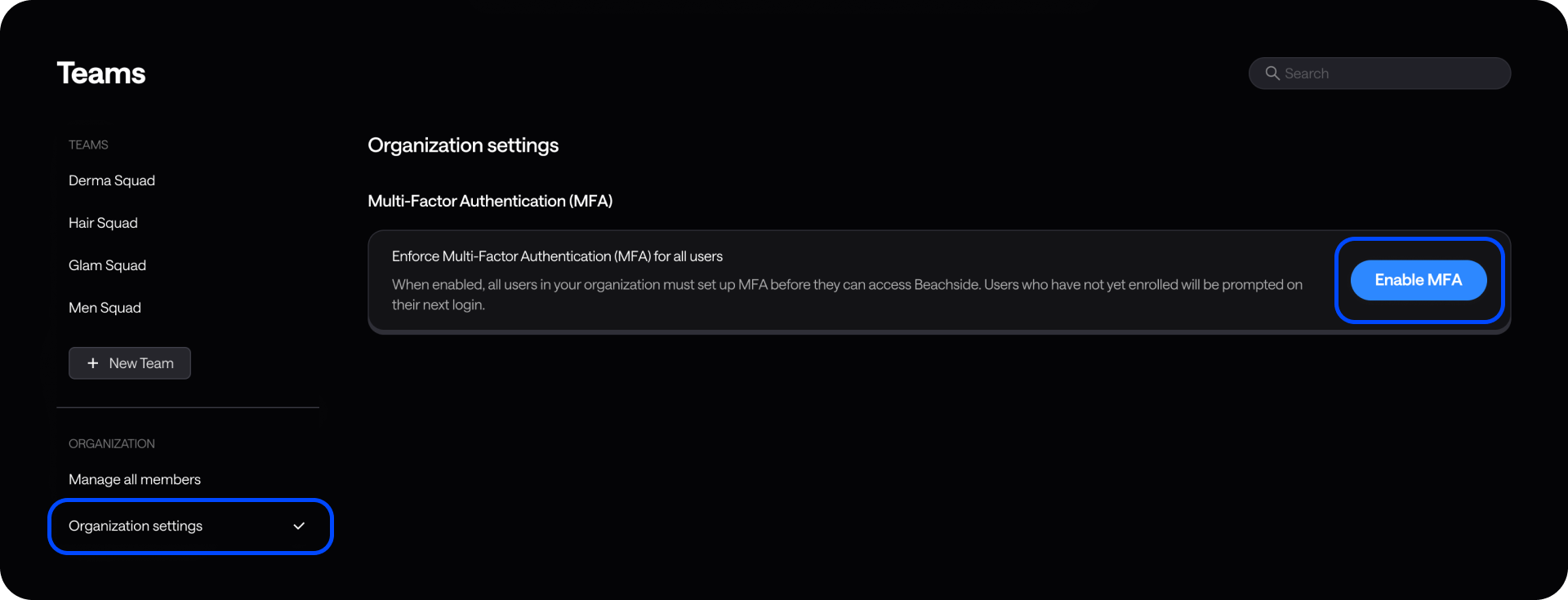
当你启用 MFA 后，它将适用于组织中的所有成员。尚未注册的成员将在下次登录时被要求设置 MFA。

* 所有成员在下次登录时都会收到注册提示。
* 成员在完成注册之前无法访问 Beachside。
* 在注册过程中，成员还将收到恢复代码（一次性备用代码）。

{% hint style="info" %}
**只有组织管理员可以启用 MFA。**\
在开启之前，请确保你可以使用身份验证器应用，这样你就能完成 MFA 登录并避免把自己锁在账户外。
{% endhint %}

<figure><img src="/files/8488930c5cb395c8ce540b673cd6764e181fe897" alt=""><figcaption></figcaption></figure>

{% stepper %}
{% step %}

#### **前往&#x20;**<kbd><mark style="color:$primary;">**团队**<mark style="color:$primary;"></kbd>**&#x20;在顶部导航栏中**

{% endstep %}

{% step %}

#### **前往&#x20;**<kbd><mark style="color:$primary;">**组织设置**<mark style="color:$primary;"></kbd>

你可以从左侧边栏、团队下方进入。
{% endstep %}

{% step %}

#### **点击&#x20;**<kbd><mark style="color:$primary;">**启用 MFA**<mark style="color:$primary;"></kbd>

按钮在右侧。点击后会打开一个弹出框。
{% endstep %}

{% step %}

#### **点击&#x20;**<kbd><mark style="color:$primary;">**启用 MFA**<mark style="color:$primary;"></kbd>

确认你要为组织中的所有用户启用 MFA。
{% endstep %}
{% endstepper %}

***

### 为成员重置 MFA

当有人丢失手机、更换设备，或无法访问其身份验证器应用和恢复代码时，可使用此功能。

* 所有成员在下次登录时都会收到注册提示。
* 成员在完成注册之前无法访问 Beachside。
* 在注册过程中，成员还将收到恢复代码（一次性备用代码）。

<figure><img src="/files/058407a1d41bf80182e93cc7bf5dedc09eeec91b" alt=""><figcaption></figcaption></figure>

{% stepper %}
{% step %}

#### **前往&#x20;**<kbd><mark style="color:$primary;">**团队**<mark style="color:$primary;"></kbd>**&#x20;在顶部导航栏中**

{% endstep %}

{% step %}

#### **前往&#x20;**<kbd><mark style="color:$primary;">**管理所有成员**<mark style="color:$primary;"></kbd>

你可以从左侧边栏、团队下方进入。
{% endstep %}

{% step %}

#### **在列表中找到团队成员**

你也可以按姓名或电子邮件地址搜索。
{% endstep %}

{% step %}

#### **将鼠标悬停在成员上并选择**  <i class="fa-ellipsis-vertical">:ellipsis-vertical:</i>

{% endstep %}

{% step %}

#### **点击&#x20;**<kbd><mark style="color:$primary;">**重置身份验证器**<mark style="color:$primary;"></kbd>

{% endstep %}
{% endstepper %}


---

# Agent Instructions
This documentation is published with GitBook. GitBook is the documentation platform designed so that both humans and AI agents can read, navigate, and reason over technical content effectively. Learn more at gitbook.com.

## Querying This Documentation
If you need additional information that is not directly available in this page, you can query the documentation dynamically by asking a question.

Perform an HTTP GET request on the current page URL with the `ask` query parameter:

```
GET https://docs.theseaai.com/main/ch/accountsetup/an-quan-she-zhi.md?ask=<question>
```

The question should be specific, self-contained, and written in natural language.
The response will contain a direct answer to the question and relevant excerpts and sources from the documentation.

Use this mechanism when the answer is not explicitly present in the current page, you need clarification or additional context, or you want to retrieve related documentation sections.