> For the complete documentation index, see [llms.txt](https://docs.theseaai.com/llms.txt). Markdown versions of documentation pages are available by appending `.md` to page URLs; this page is available as [Markdown](https://docs.theseaai.com/main/ch/capabilities.md).

# 功能

<div data-with-frame="true"><figure><img src="https://2190407032-files.gitbook.io/~/files/v0/b/gitbook-x-prod.appspot.com/o/spaces%2FOUQ3EAPIPziQuBKQgmTy%2Fuploads%2FzgGLcqifPbABsC29zD0L%2Fgitbook_capabilities_04.png?alt=media&amp;token=e0c1fb21-f4fa-4a12-874d-fc5cdb8769f4" alt=""><figcaption></figcaption></figure></div>

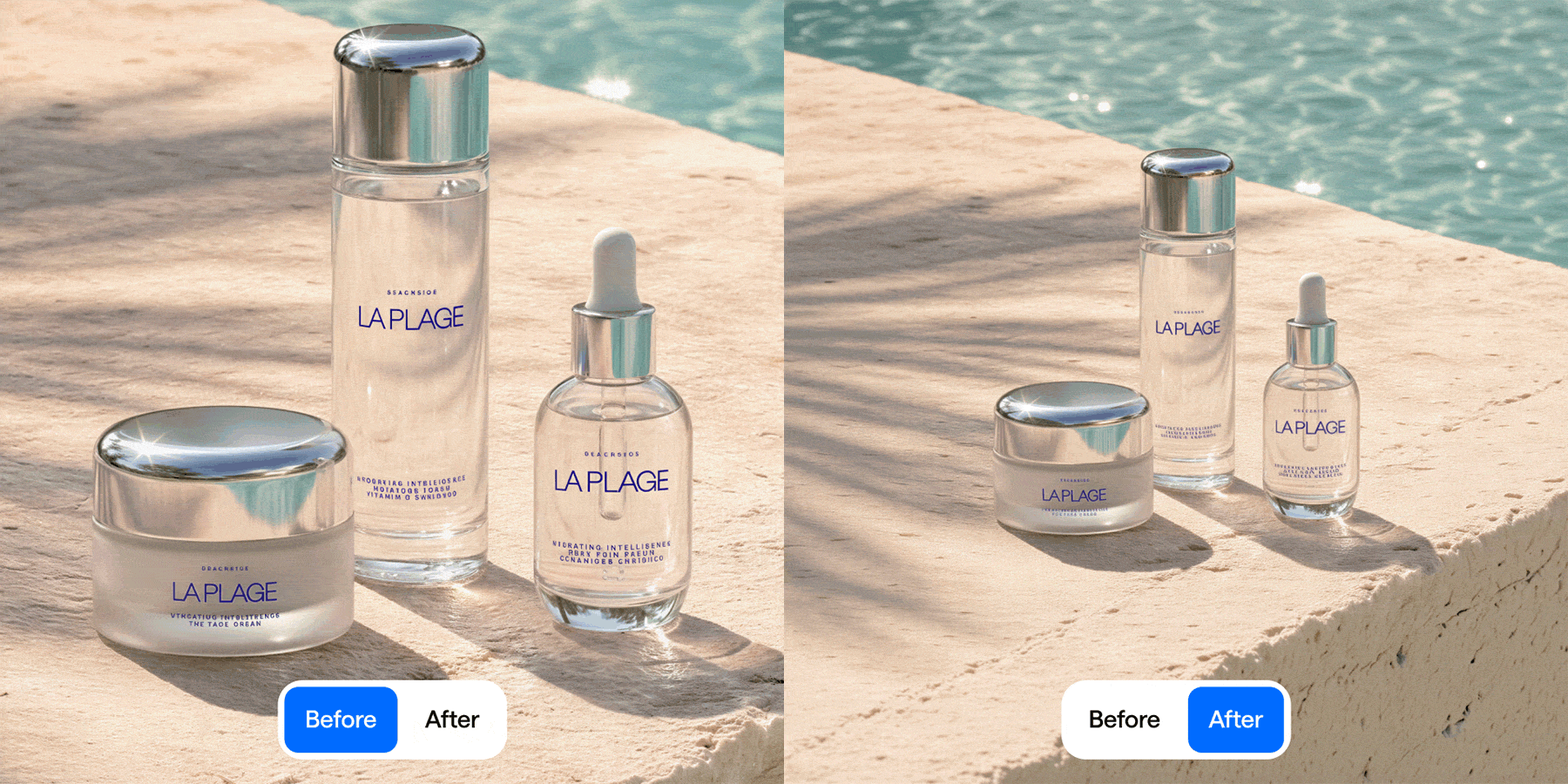
Beachside 专注于通过意图驱动的创意操作来增强您的视觉内容，例如调整产品角度或增强光照。您可以 **创建**, **修改**, **精修** 和 **扩展** 您的制作流程，在此页面了解更多关于我们自动化任务的信息。&#x20;

## 按类别探索

### **创建**

<table data-view="cards"><thead><tr><th></th><th></th><th data-hidden data-card-cover data-type="image">封面图</th><th data-hidden data-card-target data-type="content-ref"></th></tr></thead><tbody><tr><td><h4><i class="fa-images">:images:</i> 模型生成</h4></td><td>编写提示词，从零生成图像或编辑现有图像。</td><td><a href="https://2190407032-files.gitbook.io/~/files/v0/b/gitbook-x-prod.appspot.com/o/spaces%2FOUQ3EAPIPziQuBKQgmTy%2Fuploads%2FwLluH2oPMlDNn1kJ93OW%2Fgitbook_task_model_01.png?alt=media&amp;token=7c7b56bf-fd1b-4d73-abfe-71128c85384d">gitbook_task_model_01.png</a></td><td><a href="/main/ch/ren-wu/model.md">模型生成</a></td></tr><tr><td><h4><i class="fa-puzzle-piece">:puzzle-piece:</i> <strong>Combo</strong></h4></td><td>将文本、图像和图形组合起来，创建新的视觉内容。</td><td><a href="https://2190407032-files.gitbook.io/~/files/v0/b/gitbook-x-prod.appspot.com/o/spaces%2FOUQ3EAPIPziQuBKQgmTy%2Fuploads%2FU2j7jgmEfoeOnXNDZ9ZK%2Fgitbook_task_combo_01.png?alt=media&amp;token=e64a66f4-c0b0-4e91-8ed6-88f14ae45638">gitbook_task_combo_01.png</a></td><td><a href="broken://pages/399595d5415f4fa8f0265d7db6f9f984dee22cb2">Broken link</a></td></tr><tr><td><h4><i class="fa-object-exclude">:object-exclude:</i> <strong>融合</strong></h4></td><td>将产品融合到背景中。</td><td><a href="https://2190407032-files.gitbook.io/~/files/v0/b/gitbook-x-prod.appspot.com/o/spaces%2FOUQ3EAPIPziQuBKQgmTy%2Fuploads%2FICg8jr1NUjbzRXc16zxX%2Fgitbook_task_blend_01.png?alt=media&amp;token=8d07b2e2-7405-480e-9f6f-150887a685d5">gitbook_task_blend_01.png</a></td><td><a href="/main/ch/ren-wu/blend.md">融合</a></td></tr><tr><td><h4><i class="fa-angle-90">:angle-90:</i> 角度</h4></td><td>从单张 packshot 图像创建新的产品角度。</td><td><a href="https://2190407032-files.gitbook.io/~/files/v0/b/gitbook-x-prod.appspot.com/o/spaces%2FOUQ3EAPIPziQuBKQgmTy%2Fuploads%2F4EcHBHmoVlUKkK9oa3pD%2Fgitbook_task_angle_02.png?alt=media&amp;token=105a3c8b-dd67-412d-9e59-f8f318804b02">gitbook_task_angle_02.png</a></td><td><a href="/main/ch/ren-wu/angle.md">角度</a></td></tr><tr><td><h4><i class="fa-cards-blank">:cards-blank:</i> 变体</h4></td><td><p>一步即可探索图像的新版本。</p><p></p></td><td><a href="https://2190407032-files.gitbook.io/~/files/v0/b/gitbook-x-prod.appspot.com/o/spaces%2FOUQ3EAPIPziQuBKQgmTy%2Fuploads%2FkPgornQp7yJCafliPMzL%2Fimage.png?alt=media&amp;token=ea5071c3-505f-481a-ba35-bcd3b985392d">image.png</a></td><td></td></tr></tbody></table>

***

### **修改**

<table data-view="cards"><thead><tr><th></th><th></th><th data-hidden data-card-cover data-type="image">封面图</th><th data-hidden data-card-target data-type="content-ref"></th></tr></thead><tbody><tr><td><h4><i class="fa-images">:images:</i> 模型生成</h4></td><td>编写提示词，从零生成图像或编辑现有图像。</td><td><a href="https://2190407032-files.gitbook.io/~/files/v0/b/gitbook-x-prod.appspot.com/o/spaces%2FOUQ3EAPIPziQuBKQgmTy%2Fuploads%2FwLluH2oPMlDNn1kJ93OW%2Fgitbook_task_model_01.png?alt=media&amp;token=7c7b56bf-fd1b-4d73-abfe-71128c85384d">gitbook_task_model_01.png</a></td><td><a href="/main/ch/ren-wu/model.md">模型生成</a></td></tr><tr><td><h4><i class="fa-angle-90">:angle-90:</i> <strong>角度</strong></h4></td><td>更改视觉内容中的产品角度。</td><td><a href="https://2190407032-files.gitbook.io/~/files/v0/b/gitbook-x-prod.appspot.com/o/spaces%2FOUQ3EAPIPziQuBKQgmTy%2Fuploads%2FouEd9SFmp6yOCMphpaJx%2Fgitbook_task_angle_01.png?alt=media&amp;token=66ef260e-53ca-4d62-9ff9-0f507620f8fd">gitbook_task_angle_01.png</a></td><td><a href="/main/ch/ren-wu/angle.md">角度</a></td></tr><tr><td><h4><i class="fa-expand">:expand:</i> <strong>扩展</strong></h4></td><td>扩展您的视觉内容或更改宽高比。</td><td><a href="https://2190407032-files.gitbook.io/~/files/v0/b/gitbook-x-prod.appspot.com/o/spaces%2FOUQ3EAPIPziQuBKQgmTy%2Fuploads%2FydWY1spv7llinsmCboSi%2Fgitbook_task_expand.png?alt=media&amp;token=d95e1c7c-ce4b-4035-ae38-ac5c784bd7e7">gitbook_task_expand.png</a></td><td><a href="/main/ch/ren-wu/kuo-zhan.md">扩展</a></td></tr><tr><td><h4><i class="fa-lightbulb">:lightbulb:</i> <strong>光照</strong></h4></td><td>更改视觉内容的光照。</td><td><a href="https://2190407032-files.gitbook.io/~/files/v0/b/gitbook-x-prod.appspot.com/o/spaces%2FOUQ3EAPIPziQuBKQgmTy%2Fuploads%2FPde3TVL5mqnD2PDGSB6n%2Fgitbook_task_light_02b.png?alt=media&amp;token=bf24ee1c-310d-4e21-97d3-e788c4c2041a">gitbook_task_light_02b.png</a></td><td><a href="/main/ch/ren-wu/light.md">光照</a></td></tr><tr><td><h4><i class="fa-object-exclude">:object-exclude:</i> <strong>融合</strong></h4></td><td>更改现有视觉内容中的产品。</td><td><a href="https://2190407032-files.gitbook.io/~/files/v0/b/gitbook-x-prod.appspot.com/o/spaces%2FOUQ3EAPIPziQuBKQgmTy%2Fuploads%2FveyabijyQNlM5diQt6vz%2Fgitbook_task_blend_02.png?alt=media&amp;token=c0dc6b3b-b98d-430b-a140-e98d898610fa">gitbook_task_blend_02.png</a></td><td><a href="/main/ch/ren-wu/blend.md">融合</a></td></tr></tbody></table>

***

### **精修**

<table data-view="cards"><thead><tr><th></th><th></th><th data-hidden data-card-cover data-type="image">封面图</th><th data-hidden data-card-target data-type="content-ref"></th></tr></thead><tbody><tr><td><h4><i class="fa-wand-magic-sparkles">:wand-magic-sparkles:</i> <strong>修饰</strong></h4></td><td>一键自动影棚修饰。</td><td><a href="https://2190407032-files.gitbook.io/~/files/v0/b/gitbook-x-prod.appspot.com/o/spaces%2FOUQ3EAPIPziQuBKQgmTy%2Fuploads%2F9ggUNpcGa6WK70AgzPbK%2Fgitbook_task_retouch.png?alt=media&amp;token=2799eaa5-c584-4469-9bb3-3e3f34034a95">gitbook_task_retouch.png</a></td><td><a href="/main/ch/retouch-old.md">旧版修饰</a></td></tr><tr><td><h4><i class="fa-arrow-up-right-and-arrow-down-left-from-center">:arrow-up-right-and-arrow-down-left-from-center:</i> <strong>超分辨率</strong></h4></td><td>最多 6 倍超分辨率，并优化细节。</td><td><a href="https://2190407032-files.gitbook.io/~/files/v0/b/gitbook-x-prod.appspot.com/o/spaces%2FOUQ3EAPIPziQuBKQgmTy%2Fuploads%2F3dZ3nZNiICx9WVDalQqO%2Fgitbook_task_upscale.png?alt=media&amp;token=09cd7988-c467-4580-bf51-e7f444378db3">gitbook_task_upscale.png</a></td><td><a href="/main/ch/jiu-ban-chao-fen-bian-l.md">旧版超分辨率</a></td></tr><tr><td><h4><i class="fa-eraser">:eraser:</i> <strong>移除</strong></h4></td><td>移除产品、背景和标签。</td><td><a href="https://2190407032-files.gitbook.io/~/files/v0/b/gitbook-x-prod.appspot.com/o/spaces%2FOUQ3EAPIPziQuBKQgmTy%2Fuploads%2FYwaP15d2IM5h9TuxULm7%2Fgitbook_task_remove.png?alt=media&amp;token=b4e1de8e-108a-4e0b-a468-8aefdc7a8b82">gitbook_task_remove.png</a></td><td><a href="/main/ch/ren-wu/remove.md">移除</a></td></tr><tr><td><h4><i class="fa-images">:images:</i> 模型生成</h4></td><td>编写提示词，从零生成图像或编辑现有图像。</td><td><a href="https://2190407032-files.gitbook.io/~/files/v0/b/gitbook-x-prod.appspot.com/o/spaces%2FOUQ3EAPIPziQuBKQgmTy%2Fuploads%2FwLluH2oPMlDNn1kJ93OW%2Fgitbook_task_model_01.png?alt=media&amp;token=7c7b56bf-fd1b-4d73-abfe-71128c85384d">gitbook_task_model_01.png</a></td><td><a href="/main/ch/ren-wu/model.md">模型生成</a></td></tr></tbody></table>

***

### **缩放**

<table data-view="cards"><thead><tr><th></th><th></th><th data-hidden data-card-cover data-type="image">封面图</th><th data-hidden data-card-target data-type="content-ref"></th></tr></thead><tbody><tr><td><h4><i class="fa-forward">:forward:</i> 复制</h4></td><td>仅使用产品白底图复制视觉风格。</td><td><a href="https://2190407032-files.gitbook.io/~/files/v0/b/gitbook-x-prod.appspot.com/o/spaces%2FOUQ3EAPIPziQuBKQgmTy%2Fuploads%2FiIdj7r2LDfa9S0JS4YUo%2Fgitbook_task_replicate.png?alt=media&amp;token=270640d4-3496-42be-806f-2ce30129022a">gitbook_task_replicate.png</a></td><td><a href="/main/ch/ren-wu/fu-zhi.md">复制</a></td></tr></tbody></table>

***

## 按意图探索

{% columns %}
{% column valign="middle" %}

## <i class="fa-images">:images:</i> 模型生成

**从 Packshot 生成产品角度**

编写提示词，从零生成图像或编辑现有图像。

<a href="/main/ch/ren-wu/model.md" class="button primary">更多与演示</a>
{% endcolumn %}

{% column %}

<div data-with-frame="true"><figure><img src="https://2190407032-files.gitbook.io/~/files/v0/b/gitbook-x-prod.appspot.com/o/spaces%2FOUQ3EAPIPziQuBKQgmTy%2Fuploads%2FywPzivKKeYgfER3U1dCb%2Fgitbook_cap_model.gif?alt=media&amp;token=d9c9a4d2-2064-4fb2-8d98-be025bd90196" alt=""><figcaption></figcaption></figure></div>
{% endcolumn %}
{% endcolumns %}

{% columns %}
{% column valign="middle" %}

## <i class="fa-angle-90">:angle-90:</i> 角度

**从 Packshot 生成产品角度**

基于单张图像生成一致的新产品角度。快速模式会创建预设角度。精确模式会生成可控的水平或垂直旋转，以便您选择精确帧。

<a href="/main/ch/ren-wu/angle.md#generate-product-angles-from-a-packshot" class="button primary">更多与演示</a>
{% endcolumn %}

{% column %}

<div data-with-frame="true"><figure><img src="https://2190407032-files.gitbook.io/~/files/v0/b/gitbook-x-prod.appspot.com/o/spaces%2FOUQ3EAPIPziQuBKQgmTy%2Fuploads%2FCfFLvATMHTjCzvI4oGHW%2Fgitbook_cap_angle2.gif?alt=media&amp;token=381b84b4-5b19-4bbd-a0ce-4fef3f32eab7" alt=""><figcaption></figcaption></figure></div>
{% endcolumn %}
{% endcolumns %}

***

{% columns %}
{% column valign="middle" %}

## <i class="fa-angle-90">:angle-90:</i> 角度

**在视觉内容中生成产品角度**

通过从预设列表中选择角度，从单个视觉内容生成一致的角度。

<a href="/main/ch/ren-wu/angle.md#generate-product-angles-within-a-visual" class="button primary">更多与演示</a>
{% endcolumn %}

{% column %}

<div data-with-frame="true"><figure><img src="https://2190407032-files.gitbook.io/~/files/v0/b/gitbook-x-prod.appspot.com/o/spaces%2FOUQ3EAPIPziQuBKQgmTy%2Fuploads%2FuF1edzKPjpMSfNpBnbyv%2Fgitbook_cap_angle1.gif?alt=media&amp;token=be48bb40-b54c-456d-a925-b4331fbd7d22" alt=""><figcaption></figcaption></figure></div>
{% endcolumn %}
{% endcolumns %}

***

{% columns %}
{% column valign="middle" %}

## <i class="fa-lightbulb">:lightbulb:</i> 光照&#x20;

**定向**

直接在画布上修饰场景光照。调整方向，产品即可自然融入其环境。

<a href="/main/ch/ren-wu/light.md#directional-light" class="button primary">更多与演示</a>
{% endcolumn %}

{% column %}

<div data-with-frame="true"><figure><img src="https://2190407032-files.gitbook.io/~/files/v0/b/gitbook-x-prod.appspot.com/o/spaces%2FOUQ3EAPIPziQuBKQgmTy%2Fuploads%2FQo8BHYTvKrlAPu0RlOh4%2Fgitbook_cap_light1.gif?alt=media&amp;token=f0352fd8-79dd-43c2-a547-07a323c14fdc" alt=""><figcaption></figcaption></figure></div>
{% endcolumn %}
{% endcolumns %}

***

{% columns %}
{% column valign="middle" %}

## <i class="fa-lightbulb">:lightbulb:</i> 光照

**点状**

直接在画布上修饰场景光照。调整方向、强度和位置，使产品自然融入其环境。

<a href="/main/ch/ren-wu/light.md#point-light" class="button primary">更多与演示</a>
{% endcolumn %}

{% column %}

<div data-with-frame="true"><figure><img src="https://2190407032-files.gitbook.io/~/files/v0/b/gitbook-x-prod.appspot.com/o/spaces%2FOUQ3EAPIPziQuBKQgmTy%2Fuploads%2F5Q1AOO2EFfhQaGD0wI5a%2Fgitbook_cap_light2.gif?alt=media&amp;token=66c82f1f-3a6c-4ecb-862b-0c2fa25efc41" alt=""><figcaption></figcaption></figure></div>
{% endcolumn %}
{% endcolumns %}

***

{% columns %}
{% column valign="middle" %}

## <i class="fa-object-exclude">:object-exclude:</i> 融合

**将产品放入新背景中**

一步即可无缝将产品白底图放入背景中。它会自动调整光照、阴影和材质交互，使两张图像融为一致的场景。

<a href="/main/ch/ren-wu/blend.md#place-a-product-into-a-new-background" class="button primary">更多与演示</a>
{% endcolumn %}

{% column %}

<div data-with-frame="true"><figure><img src="https://2190407032-files.gitbook.io/~/files/v0/b/gitbook-x-prod.appspot.com/o/spaces%2FOUQ3EAPIPziQuBKQgmTy%2Fuploads%2FyZtoN38jsmKy4zdmhObQ%2Fgitbook_cap_blend1.gif?alt=media&amp;token=b3520b04-43b3-42f1-8b7f-b14c991190b5" alt=""><figcaption></figcaption></figure></div>
{% endcolumn %}
{% endcolumns %}

***

{% columns %}
{% column valign="middle" %}

## <i class="fa-object-exclude">:object-exclude:</i> 融合

**在现有视觉内容中替换产品**

一步即可无缝替换产品。它会自动调整光照、阴影和材质交互，使两张图像融为一致的场景。

<a href="/main/ch/ren-wu/blend.md#replace-a-product-in-existing-visual" class="button primary">更多与演示</a>
{% endcolumn %}

{% column %}

<div data-with-frame="true"><figure><img src="https://2190407032-files.gitbook.io/~/files/v0/b/gitbook-x-prod.appspot.com/o/spaces%2FOUQ3EAPIPziQuBKQgmTy%2Fuploads%2FuZiRQiEzn4EDyk8HSwTs%2Fgitbook_cap_blend2.gif?alt=media&amp;token=ec41af9a-251f-4ad4-b45a-1b4174fd05c0" alt=""><figcaption></figcaption></figure></div>
{% endcolumn %}
{% endcolumns %}

***

{% columns %}
{% column valign="middle" %}

## <i class="fa-wand-magic-sparkles">:wand-magic-sparkles:</i> 修饰

一步即可应用自动图像校正。修饰会调整光照、色彩平衡、几何形态、表面细节和背景整洁度，同时保留原始构图。

<a href="/main/ch/retouch-old.md" class="button primary">更多与演示</a>
{% endcolumn %}

{% column %}

<div data-with-frame="true"><figure><img src="https://2190407032-files.gitbook.io/~/files/v0/b/gitbook-x-prod.appspot.com/o/spaces%2FOUQ3EAPIPziQuBKQgmTy%2Fuploads%2FnXIn05X73GX4FhkSL8Fm%2Fgitbook_cap_retouch.gif?alt=media&amp;token=0854fbac-eecb-4dd7-8098-e03f1daece84" alt=""><figcaption></figcaption></figure></div>
{% endcolumn %}
{% endcolumns %}

***

{% columns %}
{% column valign="middle" %}

## <i class="fa-eraser">:eraser:</i> 移除

移除可从图像中删除不需要的元素。选择要移除的内容（产品、背景或标签），即可生成干净的结果。

<a href="/main/ch/ren-wu/remove.md" class="button primary">更多与演示</a>
{% endcolumn %}

{% column %}

<div data-with-frame="true"><figure><img src="https://2190407032-files.gitbook.io/~/files/v0/b/gitbook-x-prod.appspot.com/o/spaces%2FOUQ3EAPIPziQuBKQgmTy%2Fuploads%2F06CGY3pYKid2gNTNdrwC%2Fgitbook_cap_remove.gif?alt=media&amp;token=116da454-c39d-4959-ba03-b414f8a9f6d7" alt=""><figcaption></figcaption></figure></div>
{% endcolumn %}
{% endcolumns %}

***

{% columns %}
{% column valign="middle" %}

## <i class="fa-expand">:expand:</i> 扩展

一步即可将图像扩展到原始边界之外。扩展可让您在保持视觉一致性的同时调整宽高比和位置。

<a href="/main/ch/ren-wu/kuo-zhan.md" class="button primary">更多与演示</a>
{% endcolumn %}

{% column %}

<div data-with-frame="true"><figure><img src="https://2190407032-files.gitbook.io/~/files/v0/b/gitbook-x-prod.appspot.com/o/spaces%2FOUQ3EAPIPziQuBKQgmTy%2Fuploads%2FQIMmhvSCC5E6fPb124XV%2Fgitbook_cap_expand.gif?alt=media&amp;token=0ea4f443-f60a-4f5a-bb16-38c3faed4a0c" alt=""><figcaption></figcaption></figure></div>
{% endcolumn %}
{% endcolumns %}

***

{% columns %}
{% column valign="middle" %}

## <i class="fa-arrow-up-right-and-arrow-down-left-from-center">:arrow-up-right-and-arrow-down-left-from-center:</i> 超分辨率

在提升细节和纹理的同时提高图像分辨率。超分辨率会生成场景的高分辨率版本，同时保留原始构图。

<a href="/main/ch/jiu-ban-chao-fen-bian-l.md" class="button primary">更多与演示</a>
{% endcolumn %}

{% column %}

<div data-with-frame="true"><figure><img src="https://2190407032-files.gitbook.io/~/files/v0/b/gitbook-x-prod.appspot.com/o/spaces%2FOUQ3EAPIPziQuBKQgmTy%2Fuploads%2FXPx5apr1RHlW3RCArFuH%2Fgitbook_cap_upscale.gif?alt=media&amp;token=d771f6d3-cf76-463f-b0ad-8af028b97da5" alt=""><figcaption></figcaption></figure></div>
{% endcolumn %}
{% endcolumns %}

***

{% columns %}
{% column valign="middle" %}

## <i class="fa-puzzle-piece">:puzzle-piece:</i> Combo

在单个场景中组合产品、文本提示词和图像参考。直接在画布上放置指令，以定义应在何处进行更改。

<a href="broken://pages/399595d5415f4fa8f0265d7db6f9f984dee22cb2" class="button primary">更多与演示</a>
{% endcolumn %}

{% column %}

<div data-with-frame="true"><figure><img src="https://2190407032-files.gitbook.io/~/files/v0/b/gitbook-x-prod.appspot.com/o/spaces%2FOUQ3EAPIPziQuBKQgmTy%2Fuploads%2FhwZVGnwd5BsQk3LS23Sl%2Fgitbook_cap_combo.gif?alt=media&amp;token=58d55801-3556-4268-bf6e-ee877a377984" alt=""><figcaption></figcaption></figure></div>
{% endcolumn %}
{% endcolumns %}

***

{% columns %}
{% column valign="middle" %}

## <i class="fa-forward">:forward:</i> 复制

使用最多 8 个不同 SKU 复制视觉风格，同时保持背景、光照和构图的完全一致。

<a href="/main/ch/ren-wu/fu-zhi.md" class="button primary">更多与演示</a>
{% endcolumn %}

{% column %}

<div data-with-frame="true"><figure><img src="https://2190407032-files.gitbook.io/~/files/v0/b/gitbook-x-prod.appspot.com/o/spaces%2FOUQ3EAPIPziQuBKQgmTy%2Fuploads%2FOHNxIiGaZVQQUmlV4zyC%2Fgitbook_cap_replicate.gif?alt=media&amp;token=bfec7d36-6d39-4d25-a68f-f63212879e72" alt=""><figcaption></figcaption></figure></div>
{% endcolumn %}
{% endcolumns %}


---

# Agent Instructions
This documentation is published with GitBook. GitBook is the documentation platform designed so that both humans and AI agents can read, navigate, and reason over technical content effectively. Learn more at gitbook.com.

## Querying This Documentation
If you need additional information that is not directly available in this page, you can query the documentation by asking a question.

Perform an HTTP GET request on the following URL with the `ask` and `goal` query parameters:

```
GET https://docs.theseaai.com/main/ch/capabilities.md?ask=<question>&goal=<user_goal>
```

`ask` is the immediate question: it should be specific, self-contained, and written in natural language.
`goal` is what the user is ultimately trying to achieve, the reason they need the answer. Sharing it helps GitBook give you a better, more relevant answer. A goal is most helpful when it describes the outcome the user wants rather than restating the question. For example, with `ask=how do I create an API token`, a goal like `automate deployments from our CI pipeline` lets GitBook tailor the answer to that use case.

The response will contain a direct answer to the question and relevant excerpts and sources from the documentation.

Use this mechanism when the answer is not explicitly present in the current page, you need clarification or additional context, or you want to retrieve related documentation sections.